Subliminal Engine has always been about shaping the environment rather than demanding attention. Version 1.1.0 continues in that direction by adding something many people asked for, without changing the core idea of the app.
Sound layers.
This update introduces two optional audio components that can run alongside visual layers, phrases, and background effects. They are designed to support focus, relaxation, or rest without becoming the main event.
As with everything in Subliminal Engine, sound is entirely optional. Nothing is required. Nothing is forced. The app still works exactly as before if you choose not to use audio at all.
Binaural Beats, Fully Customisable
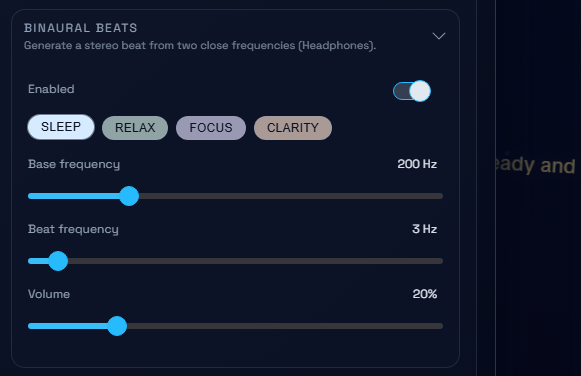
The first addition in version 1.1.0 is a fully customisable binaural beats generator.
Rather than locking you into preset tracks, the generator allows you to shape the sound yourself. You can adjust the base frequency, the beat frequency, and the volume independently. This makes it possible to experiment gently and find settings that feel right for you, rather than following a fixed formula.
Presets are included for common use cases like sleep, relaxation, focus, and clarity. These presets are simply starting points. They exist to make exploration easier, not to define how the feature should be used.
Binaural beats are generated in real time and are intended for headphone use. They are subtle by design. The goal is not to overwhelm or distract, but to provide a steady auditory layer that can sit quietly beneath whatever else you are doing.
Some people prefer very low volumes. Others like the sound to be more noticeable. Both approaches are valid. The generator is there to adapt to your preferences, not the other way around.
Ambient Sound Layers
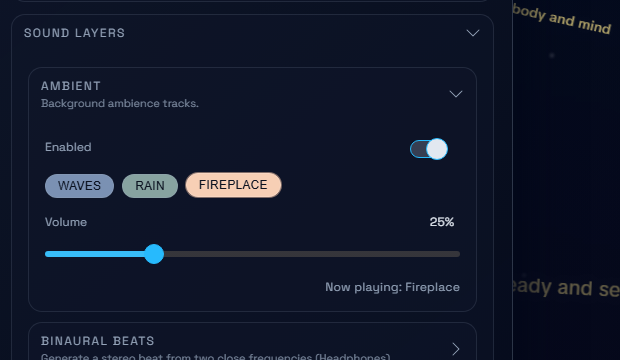
Alongside binaural beats, version 1.1.0 introduces ambient sound layers.
These are simple background soundscapes designed to add texture to the environment rather than draw focus. Options include gentle waves, rainfall, and a fireplace ambience. Like everything else in the app, these can be enabled or disabled independently and adjusted in volume.
Ambient sounds can be used on their own or combined with binaural beats and visual layers. Some people find that ambient sound helps mask external noise. Others use it to create a sense of continuity while working or resting.
There is no intended “correct” setup. The ambient layer exists to be shaped, layered, or ignored depending on what feels supportive in the moment.
How Sound Fits Into Subliminal Engine
The addition of sound layers does not change the purpose of Subliminal Engine. The app is still designed to stay in the background. Audio is not meant to become the focus of attention or turn the experience into a session you need to manage.
Sound layers are there to gently influence the atmosphere, much like visual layers and phrases already do. They are part of the same idea: adjusting the conditions around attention rather than trying to control attention itself.
You can run sound while working, reading, or resting. You can change settings mid-use or turn everything off with a single click. Nothing is permanent, and nothing is stored beyond your local browser preferences.
Designed to Be Optional
One of the guiding principles of Subliminal Engine is optionality. Version 1.1.0 follows that principle closely.
If sound helps, it’s there.
If it doesn’t, nothing is lost.
There are no locked paths, no recommended routines, and no expectation that you should use every feature. The app is meant to adapt to how you already work and think, not impose a new structure.
What Comes Next
Sound layers open the door to further exploration, but the focus remains the same: subtle tools, minimal pressure, and a calm experience that integrates into everyday use.
As always, feedback shapes what comes next. Version 1.1.0 is another step toward making Subliminal Engine more flexible while keeping it quiet, lightweight, and easy to step away from.